
Ecommerce Integration
Integration with the 5 mayor ecommerce (Salesforce, Shopify, Prestashop, VTEX, Adobe Commerce) via Wapping provided Module
Wapping provides integration support across five key ecommerce (Salesforce, Shopify, Prestashop, VTEX, Adobe Commerce), so the most complex parts are already handled in this cases.
Beyond that, some additional integration steps are required to install and connect the modules. A general integration scheme is outlined below, followed by detailed step-by-step guides for each scenario.
User flows
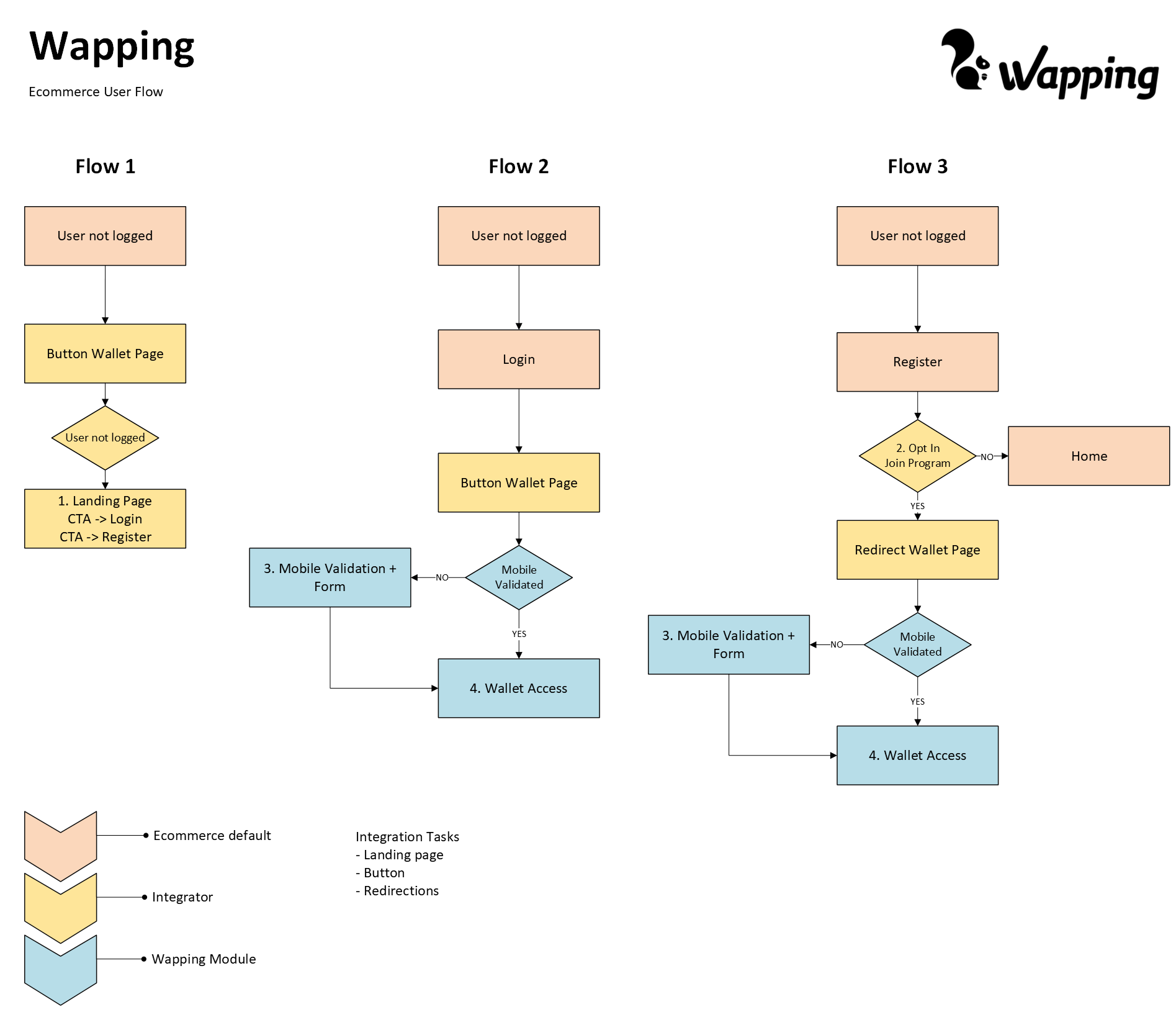
Flow 1: If the end user is not logged in and attempts to access a wallet-related CTA, they should be redirected to the Landing Page.
Flow 2: If the user is already logged in, no redirection is needed initially. However, when they try to access the Wallet, they should be redirected to the Wallet Page (embedded within the ecommerce site). From this point, Wapping manages the wallet state and determines whether validation is required or if the wallet can be displayed directly.
Flow 3: When a user registers for the first time, the integrator must redirect them to the Wallet Page if they opt in (or if opt-in is enabled by default). Wapping then handles the wallet state as in Flow 2. If the user does not opt in, they should be redirected to the standard post-registration destination (typically the homepage).
Integrator Tasks
The ecommerce integrator or business must complete the following tasks in order to reflect the behaviour defined in the previous use-cases:
-
Embed the Wallet Module:
Create a dedicated page within the ecommerce site to embed the Wallet module provided by Wapping. This typically involves placing a component on the page and varies slightly depending on the ecommerce platform. -
Create a Landing Page:
Develop a landing page that explains the loyalty program’s core concepts. This page should include CTAs directing users to the standard login or registration flows. -
Add Access Points to the Wallet:
Implement buttons, menu links, or other UI elements that allow users to navigate to the Wallet Page. These access points must check the user's login status. If the user is not logged in, they should be redirected to the Landing Page instead.
-
Adapt the Registration Flow:
Modify the registration process to redirect new users to the Wallet Page for mobile validation and initial wallet access. This can be done in two ways:
- Include an opt-in checkbox during registration and redirect only if selected.
Assume all new users are enrolled by default and redirect them in all cases. - The choice between these options is a business decision and should be implemented accordingly.
- Include an opt-in checkbox during registration and redirect only if selected.
-
Update the Checkout Experience:
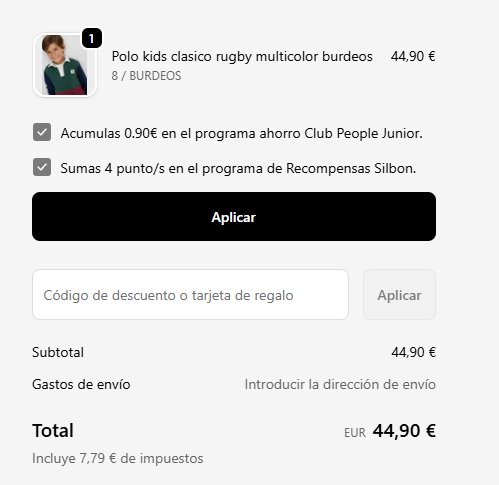
Make visual adjustments to the checkout flow to accommodate the Wallet module. This typically involves adding a div or equivalent container where the module can display benefits and interact with the customer.
Updated 11 months ago